Chapter 21: Why Pipelines Need a Scheduler
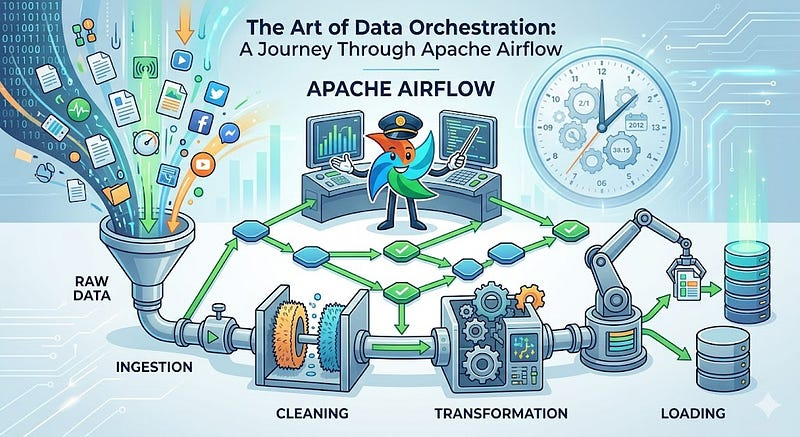
Imagine you have built a system that powers a news chatbot. The chatbot answers questions by searching through a knowledge base that is refreshed every day from three sources: a live news API, an internal database, and a third-party data feed. Each source has to be pulled in a specific order. The knowledge base index only rebuilds after all three sources finish successfully. And if any single step fails, the chatbot starts giving stale answers without anyone noticing.
You could write three Python scripts and wire them together with cron. It works, until it doesn't. The news API call times out and the index rebuild starts anyway on incomplete data. Two scripts start simultaneously because the cron intervals overlap. A failure at 2am goes unnoticed until users complain the next morning. There is no log that shows you which step broke. There is no way to retry just the failed step.
This is the orchestration problem. And it is exactly what Apache Airflow was built to solve.
21.1 What Orchestration Means
Orchestration is the process of managing, scheduling, and coordinating tasks within a workflow, ensuring they run in the right order, at the right time, with visibility into what succeeded, what failed, and why.
Without orchestration, pipelines have four common failure modes:
| Problem | What happens | Real-world cost |
|---|---|---|
| No dependency enforcement | Task B starts even when Task A failed | Corrupt data written to production |
| No retry logic | A transient network error kills the whole pipeline | Engineers woken at 3am to restart manually |
| No visibility | Failures go unnoticed until someone checks manually | Stale dashboards presented in Monday morning meetings |
| No auditability | No record of what ran, when, and with what result | Compliance failures, unable to explain data lineage |
Orchestration solves all four. A scheduler like Airflow knows about every task, every dependency, every run, and every failure, and it acts on that knowledge automatically.
The difference between a script and a pipeline is not the code. It is what happens when the code fails.
21.2 Workflow, Task, and Operator
Three terms you need to understand before anything else.
A Workflow is a sequence of tasks arranged to complete a process. The classic data engineering pattern:
Pull from API → Pull from Database → Rebuild Index → Validate
Each step depends on the one before it. This is not just a sequence — it is a contract. Step 3 should not start until Steps 1 and 2 both succeed.
A Task is a single unit of work within a workflow. Downloading a CSV is a task. Running a SQL query is a task. Sending a Slack alert is a task. Tasks are the building blocks.
An Operator defines what a task actually does. Airflow ships with a large library of pre-built operators so you rarely need to write the low-level execution logic yourself:
| Operator | What it does | Typical use |
|---|---|---|
PythonOperator | Runs any Python function | Custom transformation logic |
BashOperator | Executes a shell command | Scripts, CLI tools |
PostgresOperator | Runs a SQL query on PostgreSQL | Database transformations |
SnowflakeOperator | Runs a query on Snowflake | Cloud warehouse queries |
S3FileTransformOperator | Transforms files in S3 | Cloud file processing |
HttpSensor | Waits until an HTTP endpoint responds | API readiness checks |
FileSensor | Waits until a file appears on disk | File arrival monitoring |
EmailOperator | Sends an email notification | Alerting on completion or failure |
BranchPythonOperator | Routes execution conditionally | A/B logic, environment routing |
Think of the Operator as the "what" and the Task as the "when." The Operator is the class, the Task is the configured instance of it inside your workflow.
21.3 What Apache Airflow Is
Apache Airflow is an open-source, Python-based workflow orchestration platform. Created at Airbnb in 2014 to manage the company's growing number of data pipelines, open-sourced in 2015, and donated to the Apache Software Foundation in 2016.

Today it is used in production by thousands of organisations, from early-stage startups to major banks and financial institutions. It is the most widely adopted orchestration tool in the modern data stack.
At its core, Airflow lets you define:
- What should run: which tasks, in which order
- When it should run: on a schedule, on demand, or triggered by an event
- How failures are handled: retries, alerts, fallback logic
- Who can see what: role-based access to pipelines and logs
Everything is defined in Python, version-controlled in Git, and visible through a single web interface. That combination of code, version control, and a UI is what separated Airflow from cron jobs and made it the industry standard.
Key use cases in production today:
- ETL/ELT data pipelines (the most common)
- Machine learning workflow orchestration
- Automated analytics and reporting
- Infrastructure and DevOps automation
- Enterprise batch processing
21.4 Airflow 3: What Changed and Why It Matters
The current major version is Apache Airflow 3, a significant leap from the 2.x series. If you are learning Airflow today, learn Airflow 3. If you encounter older tutorials, this table tells you what changed:
| Area | Airflow 2 | Airflow 3 |
|---|---|---|
| Architecture | Monolithic internals | Fully modernized, pluggable |
| Scheduler | Known HA issues under heavy load | Redesigned, more reliable at scale |
| UI | Angular-based, slower | Rebuilt in React, real-time updates |
| Task Execution | Subprocesses on shared worker | Pluggable Task Execution Interface |
| Python support | 3.6+ | 3.9+ |
| REST API | Partial v1 coverage | Full OpenAPI 3.1 (v2) |
| Scheduling | Time-based only | Time-based + event-driven via Assets |
schedule_interval | Available | Removed: use schedule= |
execution_date | Primary run identifier | Replaced by logical_date |
catchup default | True | False |
| SubDAGs | Supported | Removed: use TaskGroups |
Airflow 3 is designed to be cloud-native. The biggest practical improvement: the scheduler is meaningfully more stable under production load, and event-driven scheduling (via Assets) unlocks pipeline patterns that time-based cron schedules simply cannot express.
21.5 The DAG: Airflow's Core Concept
Airflow represents every workflow as a DAG, a Directed Acyclic Graph. This is not just a naming convention. It is a mathematical constraint that makes scheduling possible.
- Directed: each edge has a direction. Task A → Task B means A must complete before B starts.
- Acyclic: no cycles are allowed. A task cannot trigger itself directly or indirectly.
- Graph: multiple tasks and dependencies form a network, not just a linear sequence.
        ┌──────────────┐
        │   extract    │
        └──────┬───────┘
               │
        ┌──────▼───────┐
        │  transform   │
        └──────┬───────┘
               │
     ┌─────────┴──────────┐
     │                    │
┌────▼─────┐        ┌─────▼─────┐
│  load_db │        │  load_s3  │
└──────────┘        └───────────┘

  Sequential tasks, then parallel branches.
  Both patterns are valid inside one DAG.
The no-cycles rule is what makes the Scheduler's job tractable. With cycles, the scheduler would have no idea where to start. Without cycles, it can always determine a valid execution order by walking the graph from root tasks (no dependencies) to leaf tasks (no dependents).
A DAG in Python
from airflow import DAG
from airflow.operators.python import PythonOperator
from datetime import datetime

with DAG(
    dag_id="daily_sales_pipeline",
    start_date=datetime(2024, 1, 1),
    schedule="@daily",
    catchup=False,
    tags=["sales", "etl"],
) as dag:

    extract = PythonOperator(
        task_id="extract",
        python_callable=extract_sales_data,
        retries=3,
        retry_delay=timedelta(minutes=5),
    )

    transform = PythonOperator(
        task_id="transform",
        python_callable=transform_data,
    )

    load = PythonOperator(
        task_id="load",
        python_callable=load_to_warehouse,
    )

    extract >> transform >> load
The >> operator expresses dependencies. extract >> transform means transform runs after extract completes successfully. The DAG file is a plain Python file. It lives in a dags/ folder. The Scheduler reads it, registers the pipeline, and handles everything from there.
Parallel Pipelines in a Single DAG
Multiple independent tasks can run at the same time:
from airflow.models.dag import DAG
from airflow.operators.python import PythonOperator
from datetime import datetime

with DAG("parallel_etl", start_date=datetime(2024, 1, 1), schedule="@daily") as dag:

    extract_api  = PythonOperator(task_id="extract_api",  python_callable=pull_api)
    extract_db   = PythonOperator(task_id="extract_db",   python_callable=pull_database)
    extract_feed = PythonOperator(task_id="extract_feed", python_callable=pull_feed)
    merge        = PythonOperator(task_id="merge",        python_callable=merge_sources)
    load         = PythonOperator(task_id="load",         python_callable=load_warehouse)

    [extract_api, extract_db, extract_feed] >> merge >> load
  extract_api ─┐
  extract_db  ─┼──► merge ──► load
  extract_feed─┘
All three extract tasks run simultaneously. merge only starts once all three complete. This is the pattern that makes Airflow genuinely faster than sequential cron jobs.
Conditional (Branching) Workflows
Not every pipeline is a straight line. Airflow supports conditional routing:
from airflow.operators.python import BranchPythonOperator

def choose_path(**context):
    hour = context["execution_date"].hour
    return "morning_report" if hour < 12 else "evening_report"

branch = BranchPythonOperator(
    task_id="branch_by_time",
    python_callable=choose_path,
)
The BranchPythonOperator evaluates a Python function and routes execution to one of several downstream tasks. Tasks on the unchosen path are marked skipped, not failed.
21.6 Cron vs Airflow
Cron schedules scripts. Airflow orchestrates workflows. The distinction sounds subtle. The practical difference is enormous.
| Cron | Airflow | |
|---|---|---|
| Dependencies | No concept of task dependencies | Full dependency management |
| Retries | No automatic retry | Configurable retries per task |
| Visibility | No UI, no dashboard | Full web UI with logs per task |
| Parallelism | Limited to OS scheduling | Multiple tasks run concurrently |
| Alerts | Requires custom scripting | Built-in email, Slack, PagerDuty |
| Backfilling | Manual | Automatic: re-run historical periods |
| Auditability | None | Full run history in metadata database |
| Code | Shell scripts | Python: testable, version-controlled |
| Event triggers | Time-based only | Time-based + data asset events |
Cron is not wrong for simple, independent scripts. When pipelines have multiple steps, dependencies between steps, and the expectation of reliability, Airflow is the right tool.
Interview Angle "Why use Airflow instead of cron?" The strong answer is not just "Airflow has a UI." It is about dependency management, retry logic, observability, and auditability. Those four things cannot be provided by cron without extensive custom scripting around every job, and that custom scripting becomes its own maintenance burden.
21.7 Event-Driven Scheduling with Assets
Airflow 3 introduced Assets (previously called Datasets), enabling pipelines to trigger when data is produced rather than on a fixed clock.
from airflow import Dataset

# Define a data asset
orders_data = Dataset("s3://my-bucket/orders/")

# This DAG produces the asset when it completes
with DAG("ingest_orders", schedule="@hourly") as dag:
    @task(outlets=[orders_data])
    def ingest():
        # writes to s3://my-bucket/orders/
        ...

# This DAG runs automatically when orders_data is updated
with DAG("process_orders", schedule=[orders_data]) as dag:
    @task
    def process():
        # runs as soon as ingest_orders writes new data
        ...
This pattern decouples producer and consumer pipelines. process_orders does not need to know or care about the clock. It only cares that fresh data arrived.
21.8 The End-to-End Picture
Before moving into architecture and setup, here is the full flow from writing a workflow to watching it run:
  1. Write a DAG in Python          →  dags/sales_pipeline.py
                │
  2. Scheduler reads the DAG file   →  registers the pipeline
                │
  3. Schedule triggers at @daily    →  creates a DAG Run
                │
  4. Tasks queued in order          →  extract → transform → load
                │
  5. Worker executes each task      →  actual Python code runs
                │
  6. Results stored in DB           →  success / failure recorded
                │
  7. Web UI shows everything        →  green / red per task per run
This flow is what Chapter 22 maps to the seven individual components of the Airflow architecture. Each step above corresponds to one or more of those components doing exactly one job.
Summary
Manual scripts and cron jobs fail data teams because they have no concept of dependencies, retries, or observability. Apache Airflow solves this by representing every workflow as a DAG, a directed acyclic graph of tasks, defined in Python, scheduled automatically, and monitored through a web interface. A Task is a single unit of work. An Operator is the class that defines what that work is. Parallel pipelines run multiple tasks simultaneously. Branching DAGs route execution conditionally. Airflow 3 adds event-driven scheduling via Assets, allowing downstream pipelines to trigger on data arrival rather than a fixed clock. Everything from a simple ETL pipeline to a complex ML workflow can be expressed as a DAG — and once it is, Airflow handles the scheduling, retries, alerting, and history automatically.