Chapter 4: Querying & Filtering
Before any dashboard can render, before any report can be emailed, before any machine-learning pipeline can train, someone has to retrieve the right rows from a database. That retrieval is a SQL query, and every query, no matter how sophisticated, is assembled from a small set of building blocks: choosing which columns to return, filtering rows down to only the relevant ones, sorting the results into a meaningful order, and capping how many rows come back.
These four operations (SELECT, WHERE, ORDER BY, and row limiting) are not just beginner concepts you graduate past. They appear in every query you will ever write, including the most complex analytical ones.
This chapter builds each concept from scratch using a single, consistent database that you will carry through the entire book.
4.1 The BikeStore Database
Every SQL example in this book uses the BikeStores database, a realistic retail schema for a chain of bicycle shops operating across multiple states. It spans two schemas (production and sales) and nine tables in total, covering everything from product catalog management to customer orders and inventory.
Working inside one real-world schema from the start has a practical advantage: you see how the same tables appear repeatedly across different problems, which is exactly how it works in practice. Real databases are not replaced between questions. They accumulate.
This chapter focuses on four tables. The full schema is shown below, with the remaining tables (stores, staffs, brands, categories, and stocks) introduced once joins arrive in Chapter 5.
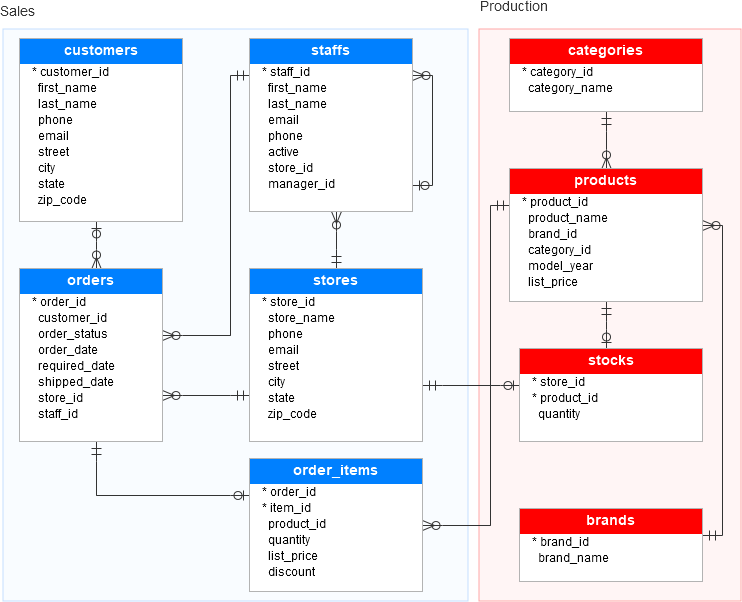
The diagram uses crow's-foot notation to describe each relationship. A single bar means "exactly one," a circle means "zero or more," and the crow's foot means "many." Reading customers ──○< orders aloud gives you: one customer has zero or many orders. That asymmetry (the "one" side and the "many" side) is the rule that makes joins work, and Chapter 5 is built entirely around it.
A few things worth knowing about the data before writing any queries:
order_statusis stored as an integer code:1= Pending,2= Processing,3= Rejected,4= Completed. Coded columns like this are common in transactional systems. They keep the orders table narrow and fast, at the cost of requiring a lookup or a mental mapping when reading results.sales.order_itemsis a junction table where each row represents one product line within one order. An order for three different bikes produces three rows inorder_items, all sharing the sameorder_id.shipped_dateisNULLfor any order that hasn't left the warehouse yet.NULLin SQL means unknown, not zero or empty, a distinction that will matter in section 4.12.
4.2 The SELECT Statement
SELECT retrieves data from a table.
SELECT * FROM production.products;
product_id | product_name                  | brand_id | category_id | model_year | list_price
-----------+-------------------------------+----------+-------------+------------+-----------
1          | Trek 820 - 2016               | 9        | 6           | 2016       | 379.99
2          | Ritchey Timberwolf Frameset   | 5        | 6           | 2016       | 749.99
3          | Surly Wednesday Frameset      | 8        | 6           | 2016       | 999.99
4          | Trek Fuel EX 8 29             | 9        | 6           | 2017       | 2899.99
5          | Heller Shagamaw Frame         | 3        | 6           | 2017       | 1320.99
* means "every column," useful for exploration, but in real queries you name what you need:
SELECT product_name, list_price
FROM production.products;
SELECT can also compute new values on the fly:
SELECT
    product_name,
    list_price,
    list_price * 0.9 AS discounted_price
FROM production.products;
product_name                 | list_price | discounted_price
------------------------------+-----------+------------------
Trek 820 - 2016                | 379.99    | 341.991
Ritchey Timberwolf Frameset    | 749.99    | 674.991
Avoid
SELECT *in real applications. It pulls columns you may not need, wastes bandwidth, and breaks silently when someone adds a column your code never expected to see.
Interview Angle Why is
SELECT *discouraged? comes up constantly in interviews. The expected answer covers three points: performance (unnecessary data transfer), maintainability (schema changes silently break downstream code), and clarity (the next person reading the query has to guess what it actually needs).
4.3 Column Aliases
AS renames a column in the output without touching the table itself.
SELECT
    product_name AS product,
    list_price AS price
FROM production.products;
AS is optional; list_price price works the same as list_price AS price, but it reads better with it. Wrap an alias in double quotes when it needs spaces:
SELECT list_price AS "Retail Price" FROM production.products;
An alias cannot be reused inside the same query's
WHEREclause:
WHEREruns beforeSELECTbuilds its aliases, sodiscounted_pricedoesn't exist yet at that point. Repeat the expression, or use a CTE (covered in Chapter 9).
4.4 Removing Duplicates with DISTINCT
SELECT DISTINCT category_id FROM production.products;
category_id
-----------
1
3
6
Without DISTINCT, the same category_id would appear once per product. With multiple columns, DISTINCT applies to the whole row; SELECT DISTINCT category_id, brand_id returns every unique combination, not separate distinct lists for each column.
DISTINCT and GROUP BY are easy to confuse early on. DISTINCT just removes duplicate rows from the output. GROUP BY exists for aggregation: counting, summing, averaging within groups, which we get to in Chapter 6. If you're not computing an aggregate, DISTINCT is the simpler tool.
Interview Angle "What's the difference between
DISTINCTandGROUP BY?" Both can appear to remove duplicates, but only one of them is built for aggregation. A strong answer explains that if no aggregate function is involved, reaching forGROUP BYis solving a problemDISTINCTalready handles more simply.
4.5 Sorting with ORDER BY
Without ORDER BY, a query's row order is not guaranteed. Most databases happen to return storage order, but nothing forces that.
SELECT product_name, list_price
FROM production.products
ORDER BY list_price DESC;
product_name                 | list_price
------------------------------+-----------
Trek Fuel EX 8 29               | 2899.99
Heller Shagamaw Frame          | 1320.99
Ritchey Timberwolf Frameset    | 749.99
Trek 820 - 2016                | 379.99
ASC is the default; DESC reverses it. Sorting by multiple columns groups by the first, then sorts within each group by the second:
SELECT product_name, category_id, list_price
FROM production.products
ORDER BY category_id ASC, list_price DESC;
Rows are grouped by category ascending, then ranked by price descending within each, the most common pattern in real reports.
ORDER BY 2 DESC(sorting by column position instead of name) works, but it's fragile; reorder theSELECTlist later and the sort silently breaks. Always sort by column name.
4.6 Limiting Rows
SELECT TOP 3 product_name, list_price
FROM production.products
ORDER BY list_price DESC;
TOP (SQL Server) always pairs with ORDER BY. Without a sort, "top" has no meaning. Standard SQL (and PostgreSQL, Snowflake) uses OFFSET ... FETCH instead, which additionally supports pagination:
SELECT product_name, list_price
FROM production.products
ORDER BY list_price DESC
OFFSET 3 ROWS FETCH NEXT 3 ROWS ONLY;
product_name                 | list_price
------------------------------+-----------
Ritchey Timberwolf Frameset    | 749.99
Surly Wednesday Frameset       | 999.99
Trek 820 - 2016                | 379.99
OFFSET 3 skips the first three rows, FETCH NEXT 3 returns the next three, exactly how a "page 2 of results" works on any website.
| Syntax | Database | Pagination |
|---|---|---|
TOP n | SQL Server | No |
LIMIT n OFFSET n | PostgreSQL, MySQL, Snowflake | Yes |
OFFSET ... FETCH | Standard SQL | Yes |
Interview Angle "How would you implement pagination in SQL?" The expected answer names
OFFSET ... FETCHorLIMIT ... OFFSETdepending on dialect, and explains thatORDER BYis mandatory alongside it, since without a defined sort order, "page 2" has no consistent meaning between two runs of the same query.
4.7 Filtering with WHERE
SELECT product_name, list_price
FROM production.products
WHERE list_price > 1000;
| Operator | Meaning |
|---|---|
= | Equal to |
<> or != | Not equal to |
> < | Greater / less than |
>= <= | Greater / less than or equal |
WHERE runs before SELECT, which is exactly why an alias built in SELECT can't be used in WHERE (section 4.3). The logical order so far in this chapter is:
  Written:   SELECT → FROM → WHERE → ORDER BY
  Executed:  FROM → WHERE → SELECT → ORDER BY
This sequence extends once GROUP BY and HAVING arrive in Chapter 6.
Interview Angle "What is the logical order of execution in a SQL query?" is asked constantly. The full answer is
FROM → WHERE → GROUP BY → HAVING → SELECT → ORDER BY, worth memorizing in full once you've seen every clause it covers. At this stage you only needFROM → WHERE → SELECT → ORDER BY; the rest arrives in Chapter 6.
4.8 Combining Conditions: AND, OR, NOT
SELECT product_name, category_id, list_price
FROM production.products
WHERE category_id = 6 AND list_price > 1000;
SELECT product_name, category_id
FROM production.products
WHERE category_id = 1 OR category_id = 3;
AND binds tighter than OR, exactly like multiplication binds tighter than addition. This causes one of SQL's most common silent bugs:
-- Intention: category 6 or 3, but only under $1000
SELECT product_name, category_id, list_price
FROM production.products
WHERE category_id = 6 OR category_id = 3 AND list_price < 1000;
product_name                | category_id | list_price
------------------------------+-------------+-----------
Trek 820 - 2016                | 6           | 379.99
Trek Fuel EX 8 29               | 6           | 2899.99   ← unexpected
Heller Shagamaw Frame          | 6           | 1320.99   ← unexpected
Surly Wednesday Frameset       | 3           | 999.99
Because AND evaluates first, this actually reads as "category 6, OR (category 3 AND under $1000)," so every category 6 product slips through regardless of price.
SELECT product_name, category_id, list_price
FROM production.products
WHERE (category_id = 6 OR category_id = 3) AND list_price < 1000;
Whenever
WHEREmixesANDandOR, add parentheses to make the grouping explicit, even when you're confident about precedence. A parenthesis costs nothing. A silent logic bug in a financial report costs a lot more.
Interview Angle Interviewers sometimes hand over exactly the buggy query from this section and ask what it returns. The right move is tracing precedence by hand (
ANDfirst,ORsecond) rather than guessing from how the query reads in English.
4.9 Filtering Ranges with BETWEEN
SELECT product_name, list_price
FROM production.products
WHERE list_price BETWEEN 500 AND 1500;
This is shorthand for list_price >= 500 AND list_price <= 1500, with both endpoints included. It works on dates the same way:
SELECT order_id, order_date
FROM sales.orders
WHERE order_date BETWEEN '2018-01-01' AND '2018-03-31';
BETWEENrequires the lower bound first.BETWEEN 1500 AND 500doesn't raise an error; it just returns nothing, which is a quieter and more dangerous kind of mistake.
4.10 Filtering Lists with IN
SELECT product_name, category_id
FROM production.products
WHERE category_id IN (1, 3, 6);
Cleaner than chaining category_id = 1 OR category_id = 3 OR category_id = 6. IN also accepts a subquery, a brief preview with the full topic covered in Chapter 9:
SELECT first_name, last_name
FROM sales.customers
WHERE customer_id IN (
    SELECT customer_id FROM sales.orders WHERE order_status = 4
);
This returns every customer with at least one completed order. For small, known lists, IN is the right tool; for large subqueries, EXISTS (Chapter 9) tends to perform better and avoids one sharp edge entirely.
Interview Angle "What's the difference between
INandEXISTS?"INcompares a value against a fixed or queried list, best for small, known sets.EXISTSchecks whether a subquery returns any rows at all, and can stop scanning the moment it finds one match, which is why it tends to outperformINon large subqueries.EXISTSalso sidesteps theNULLtrap that makesNOT INdangerous.
If the list used with
NOT INcontains even a singleNULL, the entire query silently returns zero rows, with no error or warning. When the list might containNULL, filter it out first or useNOT EXISTSinstead.
4.11 Pattern Matching with LIKE
LIKE matches text with two wildcards: % (any number of characters) and _ (exactly one character).
SELECT product_name FROM production.products
WHERE product_name LIKE 'Trek%';
product_name
-----------------------
Trek 820 - 2016
Trek Fuel EX 8 29
Trek Domane SLR 9 Disc
| Pattern | Matches |
|---|---|
'Trek%' | Starts with "Trek" |
'%Frame' | Ends with "Frame" |
'%bike%' | Contains "bike" anywhere |
'T_ek%' | "T", any character, "ek", then anything |
A pattern starting with
%, likeLIKE '%Frame', forces a full table scan, because a standard index is sorted by the start of the string and can't be used for a search that begins with "anything." A pattern like'Frame%'can use the index normally. This becomes relevant again once we cover indexing.
4.12 Handling NULL Values
NULL means unknown, not zero and not an empty string. It behaves differently from every other value in SQL.
SELECT order_id, shipped_date
FROM sales.orders
WHERE shipped_date IS NULL;
These are orders that haven't shipped yet.
WHERE shipped_date = NULLalways returns zero rows, silently, with no error. Asking "is this unknown value equal to NULL?" is itself unknown, so SQL never answersTRUEto it. Every comparison in SQL evaluates toTRUE,FALSE, orUNKNOWN, and onlyTRUErows surviveWHERE, which is exactly whyIS NULLandIS NOT NULLexist as dedicated syntax instead of=.
Interview Angle "Why does
WHERE column = NULLnever return any rows?" separates candidates who memorized SQL syntax from those who understand it. The correct answer explains three-valued logic in full: every comparison evaluates toTRUE,FALSE, orUNKNOWN, and a comparison toNULLalways lands onUNKNOWN, neverTRUE, no matter what.
Arithmetic involving NULL also produces NULL; list_price - discount becomes NULL the moment discount is NULL, not list_price. COALESCE, which substitutes a default value, is covered properly in Chapter 8.
4.13 Putting It Together
The merchandising team wants a curated list for the holiday catalog: mid-to-high-end bikes priced between $300 and $3,000, excluding bare frames, sorted from most to least expensive, top 10 only.
SELECT
    product_name,
    category_id,
    list_price
FROM production.products
WHERE list_price BETWEEN 300 AND 3000
  AND category_id IN (1, 6)
  AND product_name NOT LIKE '%Frame%'
ORDER BY list_price DESC
OFFSET 0 ROWS FETCH NEXT 10 ROWS ONLY;
product_name              | category_id | list_price
----------------------------+-------------+-----------
Trek Fuel EX 8 29            | 6           | 2899.99
Surly Straggler              | 1           | 1549.00
Trek 820 - 2016               | 6           | 379.99
BETWEEN, IN, NOT LIKE, ORDER BY, and pagination, all in one query, covering every filtering tool from this chapter on a single table.
Summary
SELECT retrieves columns; avoid SELECT * in real applications. AS aliases a column for readability, but the alias can't be reused in that same query's WHERE clause. DISTINCT removes duplicate rows; GROUP BY is for aggregation instead. ORDER BY sorts results, defaulting to ASC, and should always sort by column name rather than position. TOP and OFFSET...FETCH cap how many rows return, with OFFSET...FETCH also supporting pagination. WHERE filters using comparison operators combined with AND, OR, and NOT; parenthesize mixed logic explicitly, since AND binds tighter than OR. BETWEEN filters inclusive ranges; IN filters against a list, watching for the NOT IN plus NULL trap. LIKE matches patterns with % and _, and a leading % defeats index usage. NULL means unknown and requires IS NULL / IS NOT NULL; SQL's three-valued logic means = NULL never evaluates to true.
Exercises
4.1. Write a query that selects product_name, list_price, and a calculated column price_in_thousands (list_price divided by 1000) from production.products.
4.2. Write a query that returns the distinct list of state values from sales.customers.
4.3. Write a query that returns the 5 cheapest products, showing product_name and list_price, sorted appropriately.
4.4. Write a query that returns products priced between 200 and 600, where the category is either 1 or 6. Use BETWEEN and IN together.
4.5. The following query is meant to find affordable mountain or road bikes (categories 1 and 6) under $1000, but it has a bug. Identify it and rewrite it correctly:
SELECT product_name, category_id, list_price
FROM production.products
WHERE category_id = 1 OR category_id = 6 AND list_price < 1000;
4.6. Write a query that finds all customers whose email ends in .com and whose last_name starts with the letter "M".
4.7. Write a query that returns the 11th through 20th most expensive products using OFFSET...FETCH.
4.8. Think About It: A junior engineer writes WHERE discount <> NULL to find order items with a defined discount, and the query returns zero rows even though the table clearly has non-null discount values. Explain why, using three-valued logic, and write the correct version.